Target development IQ packet settings dialog box
This topic describes the purpose of the Target development IQ packet settings dialog box and all the settings and buttons on it. However if you require step-by-step procedures on requesting a target development IQ packet then refer to Requesting a Target Development IQ Packet .
 Overview
The Target development IQ packet settings dialog box is opened by clicking Request IQ packet on the Target development screen. It allows you to configure settings associated with a Target development IQ packet. These IQ packets allow you to identify IMSIs used at locations of interest.
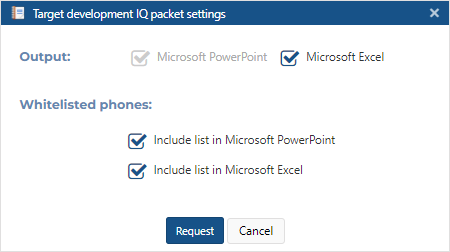
Settings and buttons
Output
By default your IQ packet is generated in Microsoft PowerPoint. You can also select to include Microsoft Excel attachments of the analysis which allow you to analyze the data further if required. The Microsoft Excel attachments are embedded in the respective slides of the Microsoft PowerPoint output.
Include whitelisted phones
Select if you want to include the list of whitelisted phones in the IQ packet.
-
Include list in Microsoft PowerPoint: this includes the list as a slide in Microsoft PowerPoint.
-
Include list in Microsoft Excel: this option is only available if the Microsoft Excel option is selected in Output. This includes a tab in the embedded Microsoft Excel attachment which includes the list.
Cancel
Click to close the dialog box without applying any changes you may have made.
Request
Click to request an IQ packet for the current analysis. Once an IQ packet is complete it is available to view in IQ packets (reports) on the Manage case screen.
NOTE: If you selected multiple cases the IQ packet is only available in the first case you selected, and the IQ packet name is only prefixed with the first case name.