Edit login options dialog box
This topic provides an overview of the Edit login options dialog box and all the settings and buttons on it. However if you require step-by-step procedures on setting up a user as a station monitor refer to How to configure an individual user's account for live monitoring (wiretap).
 Overview
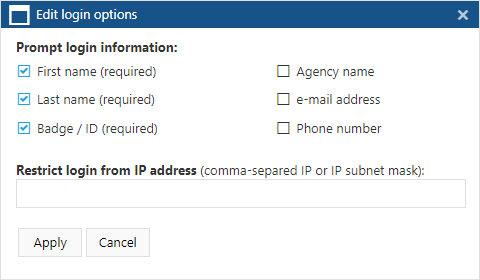
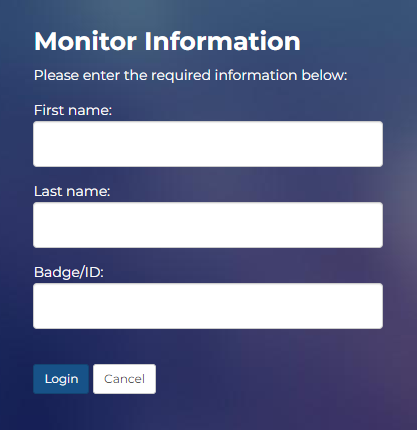
The Edit login options dialog box allows you to define what details the Sentinel station users must enter immediately after they've logged into the station account. The First name, Last name and Badge/ID are mandatory settings and recorded by OSS-ESPA when the user monitors a T3 call. These individual user details are then stored by OSS-ESPA in the audit trail so that if required you can trace who was monitoring the subject at any point in time and any actions that they too.
The following is an example of the Monitor information login screen displayed when only the default mandatory settings are selected:
Settings and buttons
Prompt login information
Select the information you want the user to be prompted to enter when they log on to the Sentinel station.
The First name, Last name and Badge/ID are mandatory settings. The Agency name, email address and Phone number are optional.
Restrict login from IP address
If you want to restrict the log on of station monitors to specific IP addresses then enter a comma separated list of the IP addresses that are allowed. Only one active session is allowed if there are no IP addresses provided here.